 |
FREE !!! |
|
|
|
FREE !!! |
|
*** Click Here to checkout the NEW OFFICIAL website for Monitor Dot! ***
10/24/22 - Story
behind this
app:
For a long time there was a popular app that was free to use by everyone. Then
recently the app suddenly displayed a message stating that a mandatory update
was required.
This update basically changed the app into a trial version that expired within
hours after installing it. To continue using the app, the company now wants a
monthly fee!
So, because they got greedy and
decided to screw over their users by disabling everyone's app without notice, I
decided to return the favor by creating my own app and giving it away for
FREE!*
Their loss, your gain.
...and please enjoy my
retro webpage design :)
Check out TechDoctorUK's review of VPN Monitor Dot:
How will VPN Monitor Dot help protect my Privacy?
VPN's help protect your privacy when you are on the internet. But they can only
do that when they are working properly.
Even if a VPN has it's "Auto-Start" feature enabled,
there is no guarantee that it will properly run 100% of the time when you power
on/bootup your device.
And even when a VPN is running properly, it may
suddenly disconnect or crash even hours later without giving you any warning!
This is why using VPN Monitor Dot
is so important
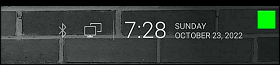
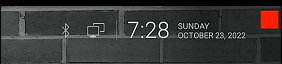
VPN Monitor Dot will continuously monitor your VPN connection and let you know it's working by displaying a status "Dot" in the top right corner of your screen...
When you ARE being protected by your VPN, the app will slowly flash a GREEN dot:
But when you are NOT being protected by your VPN (because the VPN is not turned on or it crashed), then the app will slowly flash a RED dot:
----- VPN Monitor Dot vs. the
"Other Guy's" app -----
1) Why does the "Other Guy's" app need
Read/Write Access Permission to my device's photo/files Storage?
I have no idea why the other app
needs it, but keep in mind
that because their
app also has internet access,
it could theoretically add/delete or
send your files to a remote cloud server without your knowledge or approval!
VPN Monitor Dot does not need this potentially dangerous permission
in order to fully protect you :)
2) VPN Monitor Dot was designed in a highly
efficient way to minimize it's memory/resource footprint.
Just see the
difference for
yourself:
|
The Other Guy's ---- vs. ---- VPN Monitor Dot APK
size: |
Size does matter, and being x100
TIMES
BIGGER is NOT a good thing!
Why is Smaller Better?
Because VPN Monitor Dot uses very little resources when running, it has a much higher chance of
staying loaded in memory whenever
Android decides to start killing processes to free up
resources.
That means VPN Monitor Dot will be able to stick around to help keep you protected.
The last thing you want is for your VPN to crash and never know it because the
monitoring app was killed!
IMPORTANT NOTES:
|
Installation:
|
Need additional help with installation?
Click here
for an easy tutorial from Troypoint.com!
This public link is valid for 7 days and shares a thread, including any personal information you added. This link or copies made by others cannot be deleted. If you share with third parties, their policies apply. Can’t copy the link right now. Try again later.
Never leave a device accessible without a password. Modern Axis devices force password creation upon initial boot. If you are using an older device, navigate to the system settings and set a complex password for the administrator account. 2. Update Firmware Regularly
Serveradds hum in bass, a secret undercode, one-lane highways numbered 1l, exclusive, sealed; they ferry slices of a thousand unseen roads, each packet wrapped in promises not yet revealed. inurl indexframe shtml axis video serveradds 1l exclusive
: This identifies the specific brand and hardware type (Axis) often used for security monitoring in car parks, colleges, and private residences. adds 1l exclusive
These "exclusive" links often grant strangers access to private living rooms, back offices, or industrial floors. This public link is valid for 7 days
The phrase 1l exclusive that accompanies the main query is not a standard technical term. It appears to be an identifier or a piece of "dork metadata" used by a specific individual or group. In the world of Google Dorks, security researchers, OSINT investigators, and even hackers often add personal tags or comments to the dorks they create or share. This helps them organize their findings and track which queries are effective. The presence of such a tag suggests that inurl:indexframe.shtml "Axis Video Server" is being actively used by someone in the cybersecurity community.
I can provide specific configuration hardening steps or scripts to scan your internal network for these exposures. Share public link Can’t copy the link right now
) are designed to convert analog video signals into digital streams for remote monitoring over TCP/IP networks. Axis Communications Accessing the Interface
Axis has produced network video servers for decades. Early models (e.g., Axis 2400, 2401, 241Q) used embedded web servers with .shtml pages — SSI (Server Side Includes) files. indexframe.shtml served as the main entry point for web-based configuration and live view.
Leaving internal network cameras exposed to the open web introduces serious security risks: